
Gold automation for cTrader and MetaTrader 5
ECFX XAU Dual Crown
Lock30x Core + Aurum Velocity
ECFX XAU Dual Crown is available as a cTrader cBot and a MetaTrader 5 EA for XAUUSD M5. Open the official listing for your platform, watch the cTrader visual backtest, and review the edition-specific setup information before use.
MT5 · August 2026 historical recording
Dual Crown: separate MT5 backtest video
This is the MetaTrader 5 recording, separate from the cTrader video below. It predates the 18 August v1.15 manual update and does not establish the current dashboard, defaults or delivered build. Historical results depend on the recorded settings and are not a forecast.
cTrader cBot · Now available on cTrader Store
ECFX XAU Dual Crown is now available for cTrader.
Buy the cTrader edition through the official Store listing and watch the XAUUSD M5 visual backtest below. Review the current cBot description, requirements and settings on cTrader Store, then test with your own broker data and demo account.
cTrader cBotXAUUSD / GoldM5Store listing live
Historical simulations do not guarantee future or live performance.
MetaTrader 5 edition · Two crowns
Independent strategy ownership with coordinated protection
Crown I uses the Lock30x completed-candle and pending-order framework, including its conditional Profit Boost and H1 Expansion lanes. Crown II uses Aurum Velocity market-execution logic, with separate Velocity, Channel and optional Pullback engines. The stock profile is sell-focused and does not use martingale lot multiplication.
MetaTrader 5 edition · Complete setup and settings reference
Read the complete MT5 v1.15 user manual before running the EA.
This MetaTrader 5 manual covers installation, Gold strategy points, both volume models, shared-account warnings, daily-loss protection, drawdown brakes, high-water safeguards, real-tick backtesting, validation and every exposed settings group.
23 A4 pagesUpdated 18 August 2026EA reference v1.15PDF download
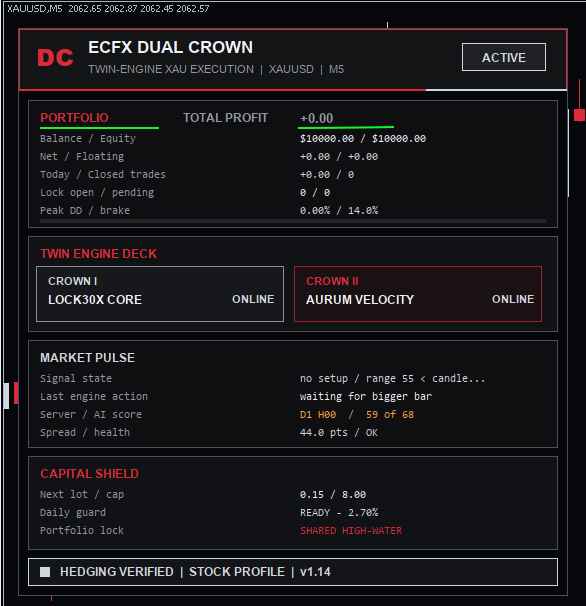
MetaTrader 5 setup · Before attaching to a chart
Start with the stock profile on XAUUSD M5.
Confirm the broker's Gold symbol, Hedging account mode, contract specification, spread, commission, server time and available real-tick history. Enable Algo Trading in both MT5 and the EA properties, then review the Experts and Journal tabs for initialization or protection messages.
Do not replace or reattach an EA while the account has open positions or pending orders without first reviewing ownership and protection state.
Risk disclosure
Automated trading software is high risk. Backtests and historical simulations do not guarantee future performance. Broker pricing, spread, commission, swap, slippage, leverage, execution, symbol specification and market conditions can materially alter results. Test independently and use only risk appropriate for the account.